What is A2UI?
A2UI (Agent to UI) is an Apache 2.0-licensed declarative protocol for agent-driven interfaces. The official repository identifies v0.9.1 as the current production release and v1.0 as a candidate. Agents describe interactive interfaces while clients render approved components instead of executing agent-generated UI code.
Visual Output Gallery
A2UI allows for the secure, declarative rendering of diverse interactive layouts, moving beyond mere text. See the official a2ui-project/a2ui repository for the latest specifications.
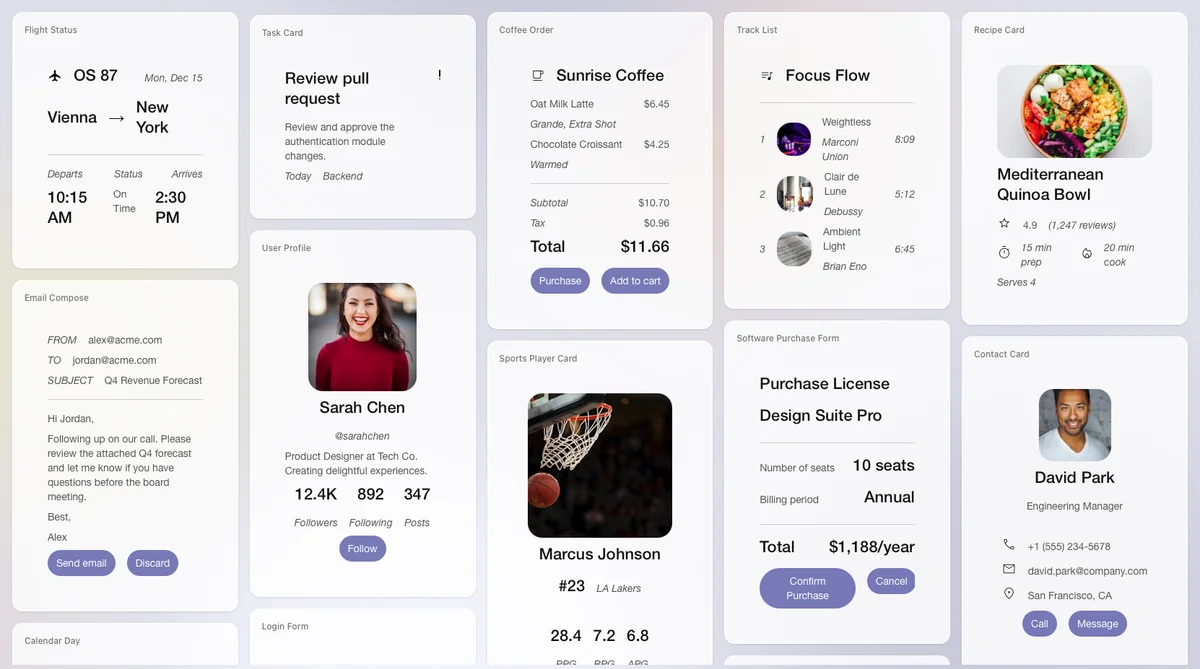 *A gallery of A2UI rendered cards, showcasing compositional variety.*The Problem
Text-only agent interactions are inefficient:
User: "Book a table for 2 tomorrow at 7pm"
Agent: "Okay, for what day?"
User: "Tomorrow"
Agent: "What time?"
...
Better: The agent generates a form with a date picker, time selector, and submit button. Users interact with the UI, not just text.
The Challenge
In multi-agent systems, agents often run remotely (on different servers or organizations). They can’t directly manipulate your UI—they must send messages.
Traditional approach: Send HTML/JavaScript in iframes.
- Heavy and visually disjointed.
- Security complexity.
- Doesn’t match host app styling.
Need: Transmit UI that is safe like data but expressive like code.
The Solution
A2UI: JSON messages describing UI that:
- LLMs generate as structured output.
- Travel over any transport (A2A, AG-UI, SSE, WebSockets).
- Client renders using its own native components.
Result: Client controls security and styling, while the agent-generated UI feels native.
Example
{
  "version": "v0.9.1",
  "updateComponents": {
    "surfaceId": "booking",
    "components": [
      {
        "id": "root",
        "component": "Column",
        "children": ["title", "datetime", "submit-btn"]
      },
      {
        "id": "title",
        "component": "Text",
        "text": "Book Your Table",
        "variant": "h1"
      },
      {
        "id": "datetime",
        "component": "DateTimeInput",
        "label": "Select date",
        "value": { "path": "/booking/date" },
        "enableDate": true
      },
      {
        "id": "submit-text",
        "component": "Text",
        "text": "Confirm"
      },
      {
        "id": "submit-btn",
        "component": "Button",
        "child": "submit-text",
        "action": { "event": { "name": "confirmBooking" } }
      }
    ]
  }
}
Client renders these messages as native components (Angular, Flutter, React, etc.).
Core Value
- Constrained rendering: Declarative data, not executable UI code. The client must still validate messages, catalogs, URLs, rich text, and actions.
- Native feel: The client renders with its own UI framework and can apply its design system and accessibility behavior.
- Portability: A compatible agent message can target clients that implement the same protocol version and Catalog; renderer coverage differs by platform.
- Progressive Rendering: Stream UI updates as they’re generated. Users see the interface building in real-time instead of waiting for complete responses.
Design Principles
- LLM-Friendly: Flat component list with ID references. Easy to generate incrementally, correct mistakes, and stream.
- Framework-Agnostic: Agent sends abstract component tree. Client maps to native widgets (web/mobile/desktop).
- Separation of Concerns: Three layers—UI structure, application state, client rendering. Enables data binding, reactive updates, and clean architecture.
What A2UI Is NOT
- Not a framework (it’s a protocol).
- Not a replacement for HTML (for agent-generated UIs, not static sites).
- Not a robust styling system (client controls styling with limited server-side styling support).
- Not limited to web (works on mobile and desktop).
Key Concepts
- Surface: Canvas for components (dialog, sidebar, main view).
- Component: UI element (Button, TextField, Card, etc.).
- Data Model: Application state, components bind to it.
- Catalog: Available component types.
- Message: Versioned JSON object such as
createSurface,updateComponents,updateDataModel, ordeleteSurfacein v0.9.
Get Started
Ready to build? Choose your path:
| Path | Link |
|---|---|
| 5-Minute Quickstart | Getting Started Guide → |
| Understand Concepts | Concepts Overview → |
| See a Real Example | Flight Search Tutorial → |